How to submit player names and numbers for a team jersey order
Submit player names and numbers in one checked roster, with a separate row for each distinct jersey configuration and clear columns for the print name, number, size, garment and quantity....
Submit player names and numbers in one checked roster, with a separate row for each distinct jersey configuration and clear columns for the print name, number, size, garment and quantity. Confirm the supplier’s submission method before sending it, and check the artwork against that same roster before approving production. For reversible basketball jerseys, specify what belongs on each side rather than assuming the instructions carry across.
TL;DR
Submit player names numbers jersey order details in one approved roster, not scattered team messages.
FE Custom serves Australian teams ordering custom sports apparel online; confirm the submission method before sending your roster.
For reversible basketball jerseys, record names and numbers for each side explicitly.
Check spelling, number assignments, sizes and quantities before approving the final artwork.
How do you submit player names and numbers for a team jersey order?
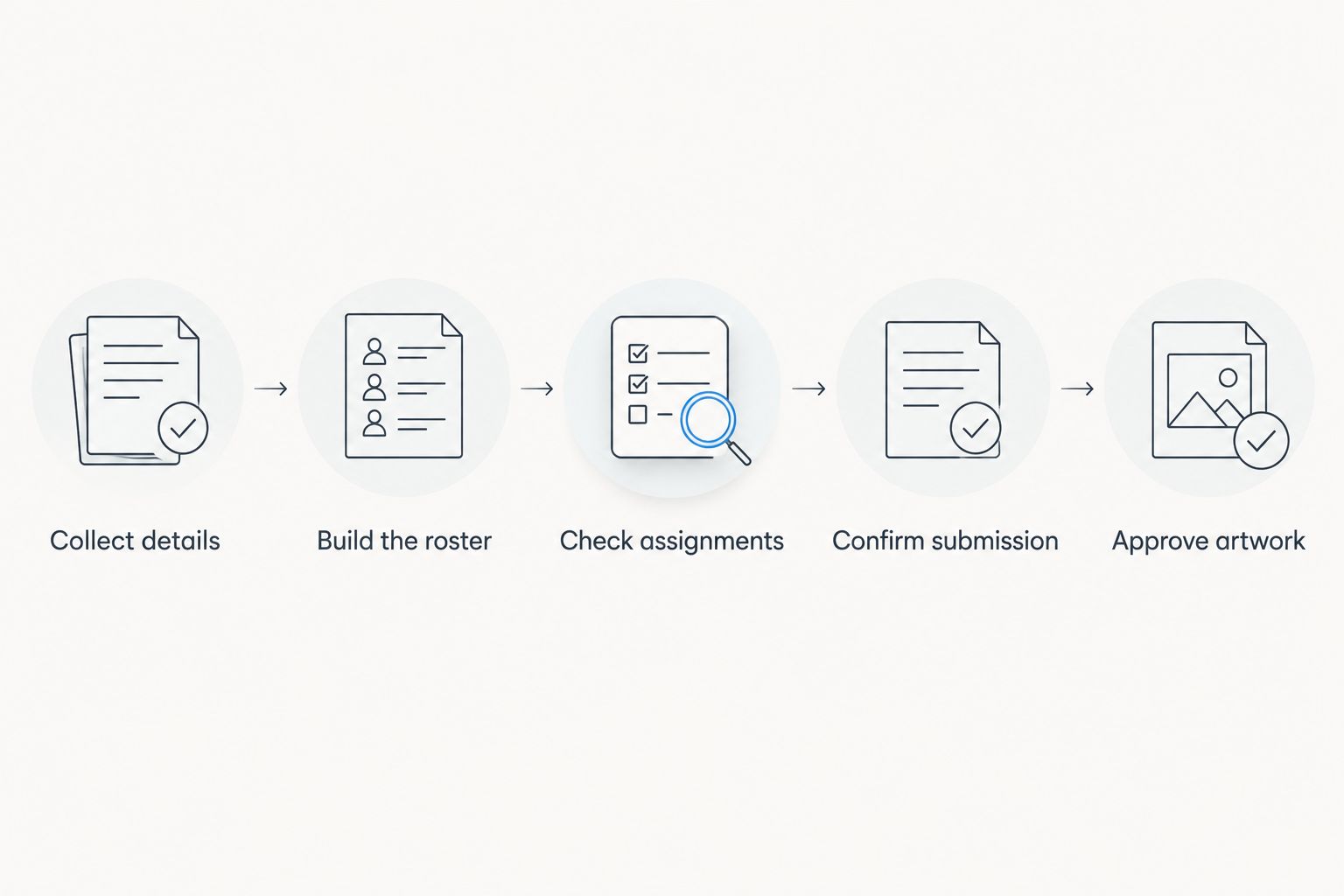
Collect the details, check the roster, then submit a clearly identified final version through the supplier’s confirmed channel. Keep the roster and artwork approval connected: a correct spreadsheet does not replace checking the design that will be printed.
Ask each player to confirm the exact text they want printed, their assigned number and their size in the selected garment. For junior teams, ask a parent or guardian to confirm the details.
Do not copy the registration name into the print-name column without checking it. A player’s registration record and preferred jersey text serve different purposes.
Build the roster
Give each distinct garment configuration its own row. Keep the name, number, size and quantity together so the supplier does not have to match separate lists.
Separate adult and youth garments, different cuts and different designs. A size label without the garment reference leaves room for confusion.
Check assignments
Check number assignments against your competition’s current requirements and the team’s agreed allocation. Resolve conflicts before submission rather than asking the supplier to choose.
Have players confirm spelling, capitalisation, punctuation and size. Keep unresolved entries out of the approved order until someone settles them.
Confirm submission
Ask which file format and submission channel the supplier accepts. Prepare the roster first, then transfer it into the requested format without changing the underlying information.
Do not assume a general order-notes box replaces a dedicated personalisation process. Confirm how the roster will be connected to your order.
Approve artwork
Compare the supplied artwork and any personalisation schedule with the final roster. Check names and numbers as well as placement, contrast and the correct garment design.
Keep a dated approval record. For a 2026 season order, identify the season and team in both the roster filename and the approval message.
Submit the checked roster before approving artwork against it.
Why this matters
A jersey order combines personal information with garment choices. You need the right spelling attached to the right number, size and design—not merely a complete list of names.
A team chat is a collection point, not the final order record. Move confirmed details into the master roster, then stop treating individual messages as separate instructions.
FE Custom operates online in Australia, so make your written brief clear enough to stand on its own. Treat roster preparation as a club responsibility, not something the supplier must reconstruct from conversations.
What should your player roster include?
Use clear column headings and keep each column to one purpose. Avoid merged cells, colour-only instructions and notes that apply to several rows without saying which ones.
The following is a recommended preparation layout, not a supplier upload specification. Adapt it to the format your supplier confirms.
Field
What to enter
What to check
Team or squad
The team receiving the garment
Separate squads with similar names
Garment reference
The selected style, cut and design
Match the actual ordered garment
Player reference
Enough information to identify the player internally
Keep it separate from print text
Print name
The exact approved lettering
Spelling, case, spaces and punctuation
Jersey number
The approved number as it should appear
Competition rules and duplicate assignments
Size
The selected garment’s size label
Confirm against its sizing information
Quantity
The number of identical garments required
Reconcile with the order total
Side instructions
Personalisation for each reversible side
Avoid implied carry-over
Approval status
Confirmed or awaiting correction
Submit only settled instructions
Keep private player contact details outside the production roster unless they are needed for the order. The person checking print text does not need a full club registration export.
For your 2026 roster, put the club, squad and season in the document heading. That gives anyone opening the file enough context to identify it without reading the email thread.
How do you keep spreadsheet numbers and names intact?
Format the jersey-number column as text before entering values. This helps preserve the intended appearance when number formatting would otherwise alter an entry.
Check the saved or exported file, not just the spreadsheet on screen. Open the version you plan to send and confirm that the names, numbers and column boundaries remain correct.
For print names, check these details deliberately:
Capitalisation: record the intended lettering rather than expecting automatic conversion.
Punctuation: preserve apostrophes, hyphens and spaces where requested.
Diacritics: keep accented letters in the roster and ask for confirmation on the artwork.
Blank names: write an explicit instruction such as No name, subject to the supplier’s template.
Long names: flag them for a layout check rather than shortening them without permission.
A blank cell is ambiguous. It does not explain whether the player wants no name, has not replied or was accidentally omitted.
Do not replace an unfamiliar spelling with a familiar one. Ask the player to confirm it and retain the approved text.
How should you submit reversible basketball jersey details?
For reversible basketball jerseys, write the personalisation instructions for both sides. Describe which design is which, and use the supplier’s side labels once confirmed.
Two sides need two explicit sets of instructions, even when the name and number are identical. This is a checking recommendation, not a claim that every reversible garment uses the same ordering process.
Use separate columns for each side’s print name, number and placement instructions. If a side should have no player name, state that rather than leaving the field unexplained.
Also check:
The same player remains associated with the correct size on both sides.
The number assignment remains consistent wherever your competition requires it.
The name and number remain readable against each side’s design.
Team lettering and sponsor artwork do not obscure player identification.
Any difference between the sides is intentional and approved.
FE Custom’s reversible basketball jersey listings include side-specific design choices. Use that distinction in your brief, but confirm the current personalisation method for your selected garment before submission.
For a 2026 reversible basketball order, keep the side instructions inside the roster rather than in a separate conversation. The person checking the artwork should not need to search old messages.
Why submission details vary between team orders
The core roster stays the same, but your instructions need to reflect the garments and players involved. These factors determine what you must clarify:
Garment type: a soccer jersey and a reversible basketball jersey need different placement instructions.
Sizing group: youth, women’s and men’s listings need their own garment references and confirmed sizes.
Design side: reversible garments require clear instructions for each side.
Print text: long names, punctuation and accented letters need an artwork check.
Competition requirements: confirm permitted numbering and identification requirements with the organiser.
Order composition: player garments, spare jerseys and replacement items need clearly distinguished entries.
Do not carry assumptions from a previous order into a new one. Check the selected garment, current instructions and intended design before reusing an old roster.
Should you use a spreadsheet, form or team messages?
Use a spreadsheet as your master record unless the supplier requires another format. A collection form can feed that record; messages are better reserved for chasing answers and resolving questions.
Method
Best for
Advantage
Limitation
Spreadsheet
Managing the final team roster
Keeps each garment’s details together
Requires careful editing and version control
Collection form
Gathering player responses consistently
Prompts everyone for the same fields
Responses still need checking and consolidation
Team messages
Reminders and individual clarification
Lets you resolve a specific question directly
Leaves instructions scattered across conversations
Do not send all three as competing sources of instructions. Consolidate the answers, confirm the master roster and submit it in the supplier’s requested format.
FE Custom is best for Australian teams that want to order custom sports apparel online. The trade-off is that your written instructions must clearly communicate the choices you want; an online order does not remove the need for roster checks.
What should you send with the final roster?
Send a short covering message that identifies the order and explains the attachment’s status. Keep design discussion separate from the final player instructions.
Include:
The team name and order reference, where assigned.
The exact filename containing the approved roster.
The selected garment or design reference.
The total garment quantity shown in the roster.
Any reversible-side instructions needing confirmation.
Your required event date and Australian delivery postcode for a timing check.
The person authorised to approve changes.
Use an unambiguous written date and specify the time zone if you set a response deadline. A required date is a request to confirm feasibility, not an agreed delivery promise.
For the 2026 season, use a filename that identifies the club, squad, season and revision. Avoid a chain of attachments all called Final roster.
How do you change a name or number after submission?
Send the correction immediately through the supplier’s confirmed channel, identifying the affected garment and the old and new instructions. Ask whether the change is still possible before treating it as accepted.
Update the master roster and identify the replacement version. State that it supersedes the previous file, then request confirmation of which version will be used.
Do not assume that sending a correction changes an order already in progress. Keep the acknowledgement with the revised roster and any updated artwork approval.
Can you submit names and numbers before everyone confirms their size?
You can collect names and numbers first, but keep incomplete entries out of final approval. A confirmed print name does not make an unconfirmed garment size ready to order.
Maintain a working roster while replies arrive. Submit the approved version only after resolving the fields needed for the selected garments.
FAQ
What’s the best way to submit player names and numbers for jerseys?
Use one checked roster in the supplier’s confirmed format, with the print name, number, size, garment and quantity kept together. Confirm how to connect that roster to your order before sending it.
Should I send player names in capital letters?
Send names in the exact capitalisation you want printed, unless the supplier’s instructions specify another method. Check that lettering again on the artwork before approval.
Can I leave the name field blank for a number-only jersey?
Use an explicit no-name instruction in the format the supplier accepts. An unexplained blank does not distinguish an intentional omission from an incomplete entry.
How do I submit details for reversible basketball jerseys?
Specify the name, number and placement instructions for each side of the reversible basketball jersey. Confirm the supplier’s side labels and check both sides before approval.
Can two players have the same jersey number?
Check your competition’s numbering requirements before assigning duplicate numbers. Resolve any conflict in the team roster before submission rather than asking the supplier to decide.
Do I need to check the artwork if my spreadsheet is correct?
Yes, check the artwork and any personalisation schedule against the approved roster. Confirm spelling, numbers, placement and garment references rather than assuming the file transferred correctly.
Can I change a player’s number after sending the roster?
Ask the supplier immediately whether the change is still possible. Send a clearly identified correction and retain confirmation before treating the revised number as accepted.
One last thing
Sort whole rows, never an isolated name or number column. Sorting only part of a roster breaks the relationship between the player, print text, number and size—even though every individual value still looks plausible.
Before sending your 2026 team jersey roster, read each completed row as a garment instruction. Then reconcile the quantities with the order and archive the approved version.