How to connect club fundraising platforms to a custom kit order
Instead of manually matching donations, player sizes and kit requests, connect your club fundraising platform to a custom kit order through a checked spreadsheet and an approval gate. This 2026...
Instead of manually matching donations, player sizes and kit requests, connect your club fundraising platform to a custom kit order through a checked spreadsheet and an approval gate. This 2026 guide shows Australian clubs how to move fundraising records into an order-ready brief without treating a donation as a garment purchase.
TL;DR
Use a checked spreadsheet to connect your club fundraising platform to custom kit order records before supplier submission.
FE Custom serves Australian clubs ordering custom sports apparel online; keep fundraising reconciliation under club control.
Separate donations, garment requests and settled funds before approving a bulk kit order.
For reversible basketball jerseys, check both sides of the design before releasing the order.
Why this matters
Money raised, money received and garments requested are different records. A supporter can donate without needing a jersey, while a player can need a jersey funded entirely by the club. Counting fundraising transactions as kit quantities mixes those records together.
FE Custom is an online Australian sports customisation store. FE Custom suits Australian clubs buying custom sports apparel online; the club must keep fundraising approval separate from garment selection.
Use the workflow below to prepare the hand-off, not to assume a direct platform integration. Start with exported records and a controlled order sheet; introduce automation only after checking what your chosen fundraising platform actually supports.
The benefit is traceability. Your treasurer can explain which funds cover the order, and your kit coordinator can identify the approved size, design and quantity for every garment.
Before you start
Access: Arrange authorised access to fundraising transactions, payout records and the club's bank reconciliation. You also need a spreadsheet editor and a named person responsible for the kit order.
Materials: Gather the campaign reference, player list, garment selections, current supplier sizing information, artwork and the supplier's current ordering requirements. Check requirements before collecting final sizes.
The gotcha: A successful contribution is not necessarily money received by the club. Reconcile payouts, deductions, refunds and any restricted donations before treating campaign proceeds as an approved kit budget.
Keep donor details out of the supplier brief unless they are genuinely needed for fulfilment. For junior teams, use the parent or guardian contact for corrections rather than circulating a public player list.
Choose your connection method
Use a checked CSV hand-off first. It gives your club a clear review point without relying on an unconfirmed connection between fundraising software and a supplier's ordering system.
Connection method
Best for
Advantage
Limitation
Checked CSV hand-off
Clubs preparing a defined order batch
Lets volunteers inspect the source records and approved quantities
Requires a fresh export and reconciliation when records change
Supported automated sync
Clubs with recurring campaigns and verified platform support
Moves supported record changes into a working register
Requires documented fields, duplicate handling and ongoing checks
Neither method should submit a custom kit order merely because a fundraising target has been reached. Funding approval and garment approval must both pass before submission.
For your 2026 campaign, document the selected method beside the campaign reference. That gives a replacement volunteer a clear starting point instead of an unexplained spreadsheet.
Campaign and order register
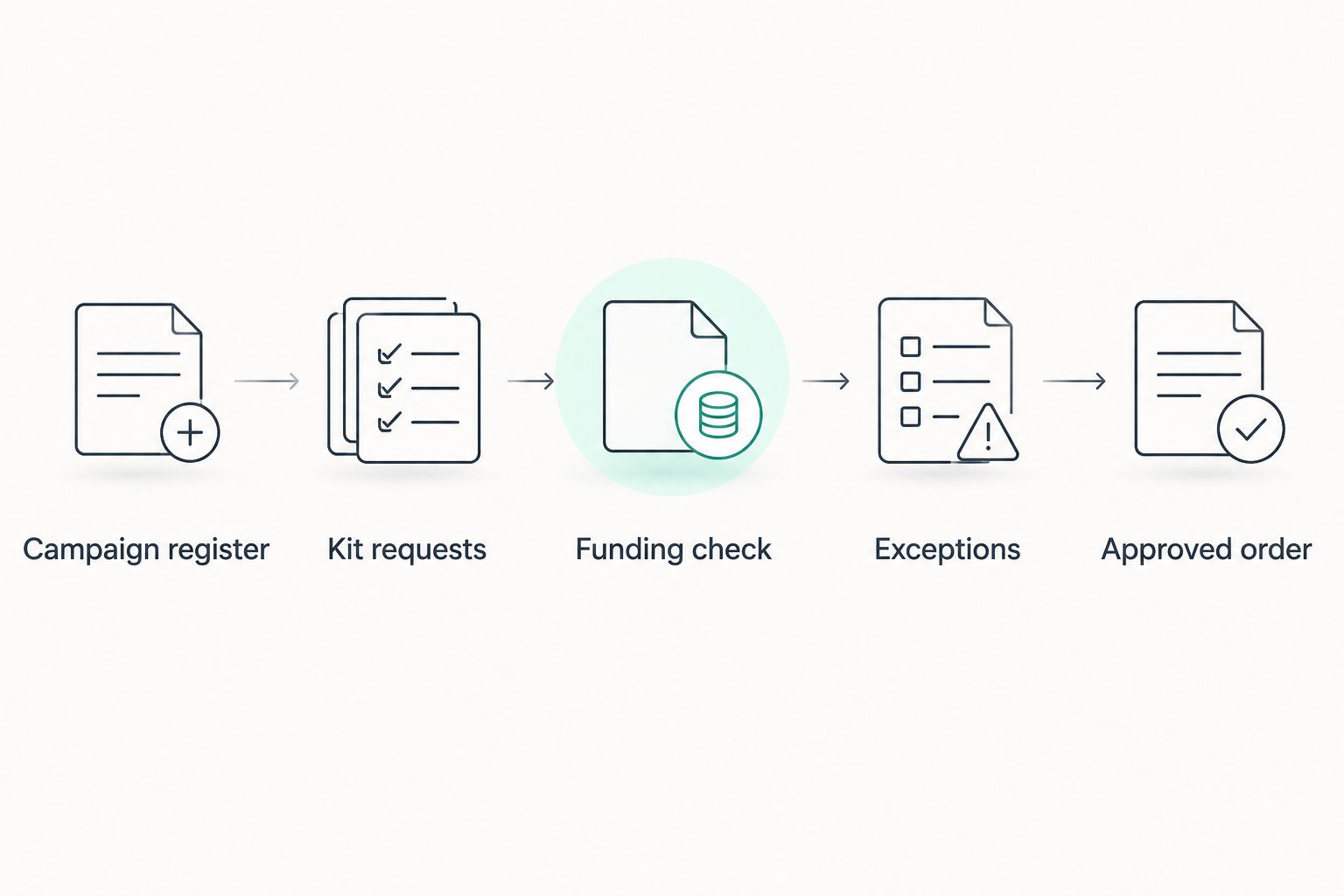
Create a workbook with tabs named Campaign register, Kit requests, Funding check, Exceptions and Approved order. These are names you create, not fundraising platform menu labels.
In Campaign register, record the campaign reference, purpose, treasurer, kit coordinator, collection deadline and intended order batch. Include the year in your own batch label, such as Basketball Winter 2026.
Record whether the campaign funds a shared club purchase or collects individual garment requests. For a shared purchase, keep the player roster separate from donor records.
Assign 1 row per garment request in Kit requests. Add a stable request reference, team, player reference, garment type, size, quantity, personalisation and approval status.
Define separate statuses for funding and garments. Use your own labels, such as Funding confirmed, Size confirmed, Artwork approved and Ready for review; do not collapse them into a single paid field.
Expected result: Every garment request belongs to a defined order batch, while the campaign's financial records remain separate and traceable.
For reversible basketball jerseys, include separate design references for each side. Keep shorts on their own garment rows so a jersey request does not silently become a complete kit request.
Keep financial checks and garment requests separate until the order is approved.
Fundraising data and field mapping
Obtain the campaign's transaction and payout records using the reporting functions documented by your platform. Retain an unchanged source copy with its export date and campaign reference.
If you use Google Sheets, open the workbook and select File, then Import, then Upload to import a CSV. Choose Insert new sheet(s) so the import does not overwrite your working register.
Map the source columns to a data dictionary. Capture transaction reference, campaign reference, transaction date, contribution type, payment status, amount, currency and payout reference wherever those fields are supplied.
Match records using stable references, not names alone. If the source has no suitable reference, assign an internal reference and document how you match it back to the original record.
Put unresolved records in Exceptions. Do not convert an unclear contribution into a garment quantity or guess which player a donor intended to support.
Expected result: You can trace each imported contribution back to its source without changing the original export.
Set the workbook's reconciliation date clearly, including the year. A campaign snapshot dated in 2026 should not be mistaken for a live balance. Keep transaction dates and payout dates in separate columns rather than overwriting one with the other.
Funding checks and garment validation
Reconcile contributions against payout records and the club's bank records. Record deductions, refunds and other adjustments separately; do not assume the headline campaign total equals the amount available for the order.
Have the treasurer allocate the approved funding to the order batch. Record any restrictions on its use and any club-approved contribution from other funds.
Validate each garment request against the selected garment's current size chart. Keep jersey and shorts sizes separate, and ask the requester to resolve missing or conflicting selections.
Check player names, numbers and artwork references. For reversible basketball jerseys, review both sides and confirm that each side carries the intended details.
Run 3 test cases before using the register: a donation without a garment request, a refunded contribution and a player needing different jersey and shorts sizes. Confirm each reaches the correct review outcome.
Expected result: The batch has an approved funding allocation, a checked garment list and a visible exceptions queue.
FE Custom custom sports apparel orders still need a clear club brief. Read the jersey design proof and approval guide before treating fundraising completion as permission to release artwork.
Approved order and supplier hand-off
Build Approved order from garment requests that have passed the relevant checks. Include only the information required to describe the order; leave donation history and unnecessary financial details behind.
Produce a quantity summary by garment, size and design. Compare that summary with the individual request rows so personalisation and totals agree.
Require 2 approvals: the treasurer confirms funding, and the kit coordinator confirms quantities, sizes and artwork. Record each approval against the same batch version.
Save a dated, read-only copy before submission. Include 2026 in the version label and record later corrections separately rather than editing the approved copy without a record.
Check the supplier's accepted submission method and required fields, then place the order through that process. Record the supplier's order reference against the approved batch.
Expected result: Your supplier receives a checked order brief, and your club retains the matching financial and garment approvals.
A spreadsheet row is not a placed order. Keep internal readiness, supplier submission and supplier acknowledgement as separate milestones. Confirm the delivery destination and required event date with the supplier rather than treating your campaign deadline as a delivery commitment.
Update the register whenever campaign records change
A second workflow handles corrections while fundraising remains open. Use it to refresh the working register, not to silently change an order already submitted.
Obtain a fresh export, or use a documented update event if your fundraising platform and chosen connection support it.
Match each incoming record to the existing transaction reference. Update the matching record rather than appending a second contribution.
Send refunds, changed allocations and unmatched records to Exceptions. Flag any change that affects the funding approved for a batch.
Notify the responsible club reviewer through your agreed process. Keep the last approved supplier brief unchanged until a replacement version is authorised.
If the order has already been submitted, ask the supplier whether the requested change can be accepted. Record the answer before updating the club's final order record.
Expected result: New information changes the working register without rewriting an approved order behind the reviewers' backs.
For automated syncing, use only documented event names, fields and permissions from the selected platform. Test duplicate deliveries and changed payment states before relying on the connection. Keep a manual export procedure available for reconciliation.
Troubleshooting
The fundraising total exceeds the reconciled funds
Compare the campaign total with transactions, payout statements and bank receipts for the same reporting period. Separate pending funds, deductions and refunds. Approve the order against reconciled funding, not the campaign's headline figure.
Importing the latest CSV doubles the contributions
Do not total repeated exports as separate batches of income. Match incoming records to their transaction references, then update existing records. If references are missing, stop the import and resolve the matching method before continuing.
A donation has been counted as a jersey request
Remove the contribution from the garment quantity calculation and retain it in the fundraising records. Create a kit request only when the club has an explicit garment requirement, including the selected size and design.
A player appears under a parent's payment name
Use the request reference to connect the payment record and garment request. Ask the parent or guardian to confirm an unclear match. Never overwrite the donor's source record with the player's details just to make the names agree.
A change arrives after the order was approved
Record the requested amendment separately and identify the affected batch version. Obtain renewed approval where funding or garment details change, then confirm acceptance with the supplier. Do not assume that editing your spreadsheet changes the submitted order.
Customise your workflow
Once the hand-off works, add team-level summaries for soccer or basketball squads. Keep the underlying garment rows intact so a club-wide total does not hide a missing size or an unresolved personalisation request.
For reversible basketball jerseys, add separate review fields for each side's artwork. For soccer kits, keep jersey and shorts selections distinct. Use the same approval discipline for tennis and pickleball apparel without assuming that different garments share sizing.
FE Custom serves Australian shoppers online, so give the club a single nominated ordering contact. Route questions and changes through that person, while keeping funding approval with the treasurer.
At the end of the campaign, archive the source exports, reconciliation, approved brief and supplier reference together. Remove unnecessary access when volunteers leave the role, and apply your club's record-retention requirements to personal information.
FAQ
How do I connect a club fundraising platform to a custom kit order?
Export the campaign records, reconcile the funds and match approved garment requests in a controlled spreadsheet. Submit the checked brief through the supplier's accepted ordering process rather than treating every donation as an order.
Do I need a direct integration with FE Custom?
This workflow does not depend on a direct integration with FE Custom. Prepare an approved kit brief and confirm the current submission requirements before placing the order.
Should every donation create a jersey order?
No. A donation only creates a garment requirement when the campaign explicitly includes a garment request and the necessary details are confirmed. Keep general contributions separate from kit quantities.
Can I place the order as soon as the fundraising target is reached?
Reaching the target is not enough to approve the order. Confirm reconciled funding, garment quantities, sizes and artwork before submission.
How do I handle reversible basketball jerseys in the order sheet?
Keep a distinct garment request and record the design references for both sides. Check names, numbers and sponsor artwork on each side before approval.
What happens if a contribution is refunded after approval?
Flag the refund for the treasurer and reassess the batch's funding allocation. If the order has been submitted, confirm any proposed amendment with the supplier rather than changing only the spreadsheet.
Can I automate updates from the fundraising platform?
Use automation only where the selected platform documents the required events, fields and permissions. Keep updates in a working register and require approval before they affect a submitted order.
One last thing
The donor and the wearer are not necessarily the same person. Give the garment request its own reference from the start; that small decision keeps family contributions, club-funded players and donation-only supporters from distorting your order.